A loopback device enables you to simulate a block device using an ordinary disk file.Data can be written or read from a file name disk-image rather than to and from the tracks and sector of an actual physical disk drive or disk partition.(ofcourcd disk-image must reside on an actual disk,which must be larger than the simulated disk). Loopback devices are named like /dev/loop0, /dev/loop1, and so on.Each can be used as a single block device at one time. Be sure when you are stting up loopback device you should be logged as a super user.
This loopback device can be used as any other block device(like your hard disk). You can create file system and mount this files system as you would mount the file system on a normal disk or partition.Such type of file system is basically called virtual file system.
Construct the virtual File System and Mount it with loopback device(Follow this step)
1.Create any 10MB file using dd command to hold the virtual file system. You can create this file anywhere as you like but i like to create in /tmp.
[suman@linux tmp]#dd if=/dev/zero of=/tmp/disk-image count=20480
your output should be like
20480+0 records in
20480+0 records out
10485760 bytes (10 MB) copied, 0.218746 seconds, 47.9 MB/s
2.cheack with ls -l command
[suman@linux tmp]# ls -l /tmp/disk-image
-rw-rw-r-- 1 suman suman 10485760 Jun 22 15:43 /tmp/disk-image
3.Now create a file System (i prefered ext2 File System..U can choose as you like) by this command
suman@ajit program]$ mke2fs -q /tmp/disk-image
It will ask for proceed just put y
/tmp/disk-image is not a block special device.
Proceed anyway? (y,n) y
4.Mount the file system using loopback device. Before that you need to create one mount point for the virtual file system.
[suman@linux tmp]# mkdir /tmp/virtual_fs
[suman@linux tmp]# mount -o loop=/dev/loop0 /tmp/disk-image /tmp/virtual_fs
5.If you don't see any error, you have successfully mounted the file System . Now cheack it through this command
[suman@linux tmp]#df -h /tmp/virtual_fs
you would see
Filesystem Size Used Avail Use% Mounted on
/tmp/disk-image 9.7M 92K 9.1M 1% /tmp/virtual_fs
6. Create one test file to test whether it is working correctly or not
[suman@linux tmp]# cd /tmp/virtual_fs
[suman@linux tmp]#echo 'I have done' >test.txt
[suman@linux tmp]#ls -l
lost+found test.txt
[suman@linux tmp]#cat test.txt
I have done
......lost+found is a direcxtory that was automatically added by mke2fs.
If want to unmount the file system just put this command
[suman@linux tmp]# umount virtual_fs
Why should i need loopback device? This question may arriase..let me tell one situation and explain me how we can use loopback device..
You have one CDROM image and you are using frequently. You need to just copy the whole CDROM image into new loopback device...you can do like that
[suman@linux]$ cp /dev/cdrom /tmp/disk-image
or
[suman@linux]$dd if=/dev/cdrom of=/tmp/disk-image
This may take several time depends on the size of your CD ROM. The resulting image file could be as large as the contents of the CDROM.
Now you can mount the CDROM image with out having the original CDROM in your CDROM.For example
[suman@linux]# mount -o loop=/dev/loop0 /tmp/disk-image /mnt/cdrom
You can access much faster than CDROM beacause whole CDROM content is in Hard Disk. Note most CDROM use the file System type iso9660.
You are playing a game which always needs your CDROM. You could not play without CDROM and sometimes you are seeing that your game is going to slow as you expected. Well create a loopback device and copy the CROM contents and mount it......and Enjoy...You are not accessing CDROM phisically which could save your CDROM life.
If you have any comments any question and also if you found any error about this mini tutorial please mail me and please leave your suggestion in comment section that i can improve later. I always apologies my poor english expression. forgive me..
Thursday, June 22, 2006


Wednesday, June 21, 2006
Tuesday, June 20, 2006
Linux kernel Develoment
Now a days i am little bit busy. I am learning how to write device driver under linux(maily char and USB). i have spend lots of time to search good meterial (for beginner) from internet.I started with LKMPG 2.6.x from tldp.org. Next I should read LDD3 by rubini(reading..)I listed some online metirial which i found during my study. Hope you could save some time to finding these metirial. I have given all the downloadable link. You just have to click the link and save it. Second tutorial is a link for entire book. You could get chapterwise pdf file from this site.
Tutorial No. 1
The Linux Kernel Module Programming Guide
Tutorial No. 2
Linux Device Driver by Jonathan Corbet, Alessandro Rubini, and Greg Kroah-Hartman(2.6.x kernel) Tutorial No.3
Writing Character Device Driver for Linux
Tutorial No. 4
Programming Guide for Linux USB Device Drivers
Those who are realy interested in kernel development and device driver here is great resource list.
Kernel Resource List
Happy Hacking!
Tutorial No. 1
The Linux Kernel Module Programming Guide
Tutorial No. 2
Linux Device Driver by Jonathan Corbet, Alessandro Rubini, and Greg Kroah-Hartman(2.6.x kernel) Tutorial No.3
Writing Character Device Driver for Linux
Tutorial No. 4
Programming Guide for Linux USB Device Drivers
Those who are realy interested in kernel development and device driver here is great resource list.
Kernel Resource List
Happy Hacking!
Sunday, June 18, 2006
Running FreeBSD inside Fedora Core 5: QEMU A processor Emulator
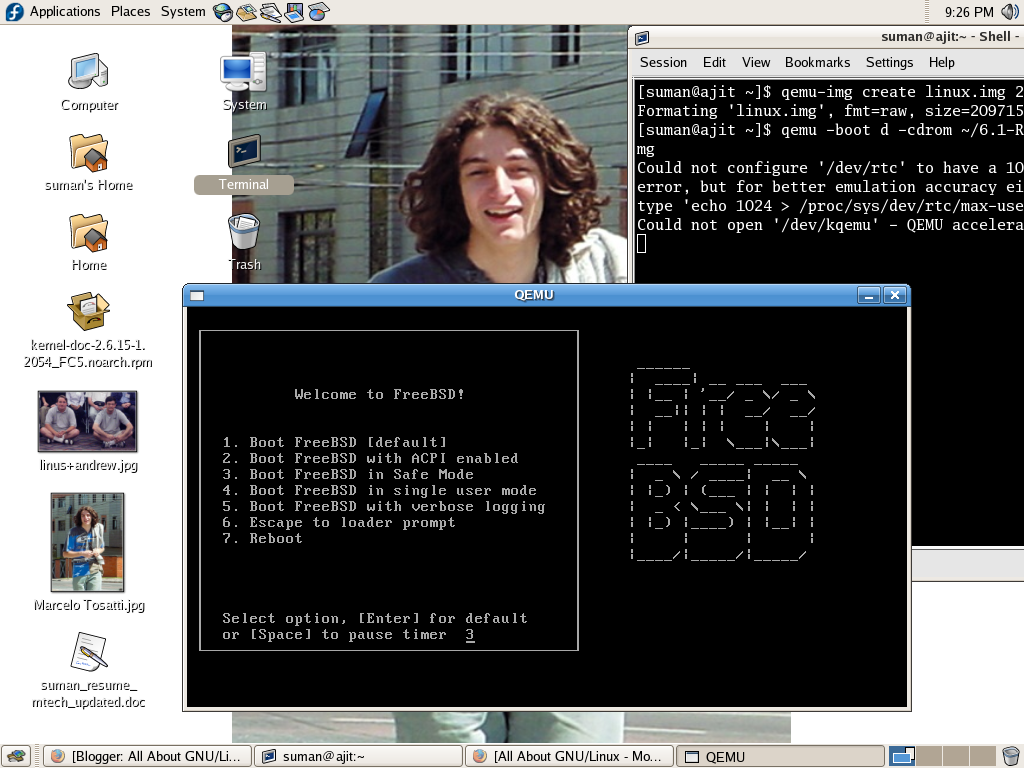
Processor emulator is one kind of software which will allow one operating system to run in another operating system.We don't need to reboot the system and write boot sector in MBR.
It is very much usefull for testing cross platform application. Say you want to build one application which should run GNU/Linux,Micro$oft,FreeBSD and MAC OS. Then probabily you would need four different system or one system with four operating System.But every timr you have to reboot your system and test your application. Virtualization(i.e Processor Emulator) will help you to run four operating system in one platform. Just you have to switch one OS to onather by clicking your mouse.
There are many such type of application,both are open source and propitary. Here I have given some list , If you know another please update it.
Open Source:Xen,Bochs,QEMU,PeerPC etc
Propitary:Vmware,Micro$oft Virual PC etc
I have successfully installed freeBSD under my Fedora core 5 through QEMU.(Just for showing how it works) Here i am writing very small HOW-TO for Fedora code 5.
(As it is small , I am going to install from RPM not from source)
Step 1: First Get RPM fro FC5(Link)

Step 2: go to root by typing su - and your password
[suman@ajit ~]$ su -
Password:
Step 3: Install RPM
[suman@ajit qemu]# rpm -ivh qemu-0.8.1-1.fc5.i386.rpm
Step 4:put this command
[suman@ajit ~]$ qemu-img create linux.img 2G
after successfull creation of linux.img file it should shows this message
"Formating 'linux.img', fmt=raw, size=2097152 kB"
Step 5: If you download iso image into your home directory then give this command
[suman@ajit ~]$ qemu -boot d -cdrom ~/6.1-RELEASE-i386-bootonly.iso -hda linux.img
Or
If you have CDROM then give this command
[suman@ajit ~]$ qemu -boot d -cdrom /dev/cdrom -hda linux.img
Congratulation! You will see that a freeBSD is booting from a separate window from your present Operating System..
Step 6:Relax and enjoy multiple Operating System from your system...
In this tutorial I didn't include any comment regarding any command. It is your task to read and understand .I am hereby giving some link from internet which will help you to understand..best of Luck!!
link1
Link2
Let me know if you have any comments regarding this mini tutorial..
Friday, June 09, 2006
GDB: A GNU Debugger
I recently wanted to learn GDB(Briefly). I searched in google with keyword " GDB tutorial"and google gave me this peter page. If you are writing program in linux it would be helpful to you. Peter started this tutorial with memory layout of a program and discussed gdb command with example. Any one who wants to know gdb could start from this tutorial. Anyway peter has also other good stuf . You can visit his site.
More inforation about GDB:
Official GDB User Manual
Norman Matloff tutorial on GDBPrinceton University GDB tutorial
RMS's gdb debugger tutorial
uchicago University tutorial
More inforation about GDB:
Official GDB User Manual
Norman Matloff tutorial on GDBPrinceton University GDB tutorial
RMS's gdb debugger tutorial
uchicago University tutorial
Wednesday, May 31, 2006
two handful commands
Do you want to make shortcut in your command ?Then run this command into your command line
command format: alias [shoutcut-command]=[command]
example:
>alias=c=clear
Do you want to revoke this alias? Run this command in to your coomand line
>unalias c
How to open CDROM with command line?
Run this comand
>eject /dev/cdrom or > eject /mnt/cdrom or just run > eject .Bash shell will take CDROM device as a default device.
how to close the CDROM Device with command line?
> eject -t /dev/cdrom or simply put >eject -t
command format: alias [shoutcut-command]=[command]
example:
>alias=c=clear
Do you want to revoke this alias? Run this command in to your coomand line
>unalias c
How to open CDROM with command line?
Run this comand
>eject /dev/cdrom or > eject /mnt/cdrom or just run > eject .Bash shell will take CDROM device as a default device.
how to close the CDROM Device with command line?
> eject -t /dev/cdrom or simply put >eject -t
Wednesday, May 24, 2006
Know about web syndication
RSS is a family of web feed formats, specified in XML and used for Web syndication. RSS is used by (among other things) news websites, weblogs and podcasting. The abbreviation is variously used to refer to the following standards:
Really Simple Syndication (RSS 2.0)
Rich Site Summary (RSS 0.91, RSS 1.0)
RDF Site Summary (RSS 0.9 and 1.0)
Really Simple Syndication (RSS 2.0)
Rich Site Summary (RSS 0.91, RSS 1.0)
RDF Site Summary (RSS 0.9 and 1.0)
Web feeds provide web content or summaries of web content together with links to the full versions of the content, and other metadata. RSS, in particular, delivers this information as an XML file called an RSS feed, webfeed, RSS stream, or RSS channel. In addition to facilitating syndication, web feeds allow a website's frequent readers to track updates on the site using an aggregator.
(PS: Content has been taken from wikipedia.).
I am using suse 10 with kde 3.5. I used "akregator" to get the feeds from site.
visit Redhat site for more information.
Further reading
- News aggregator—Wikipedia article on news aggregators
- Sage—the main Sage website
- Liferea—the main Liferea website
- Feedster—a site to find new feeds
- RSS History—a timeline depicting growths and directions
Friday, May 19, 2006
how to write a system tray application?
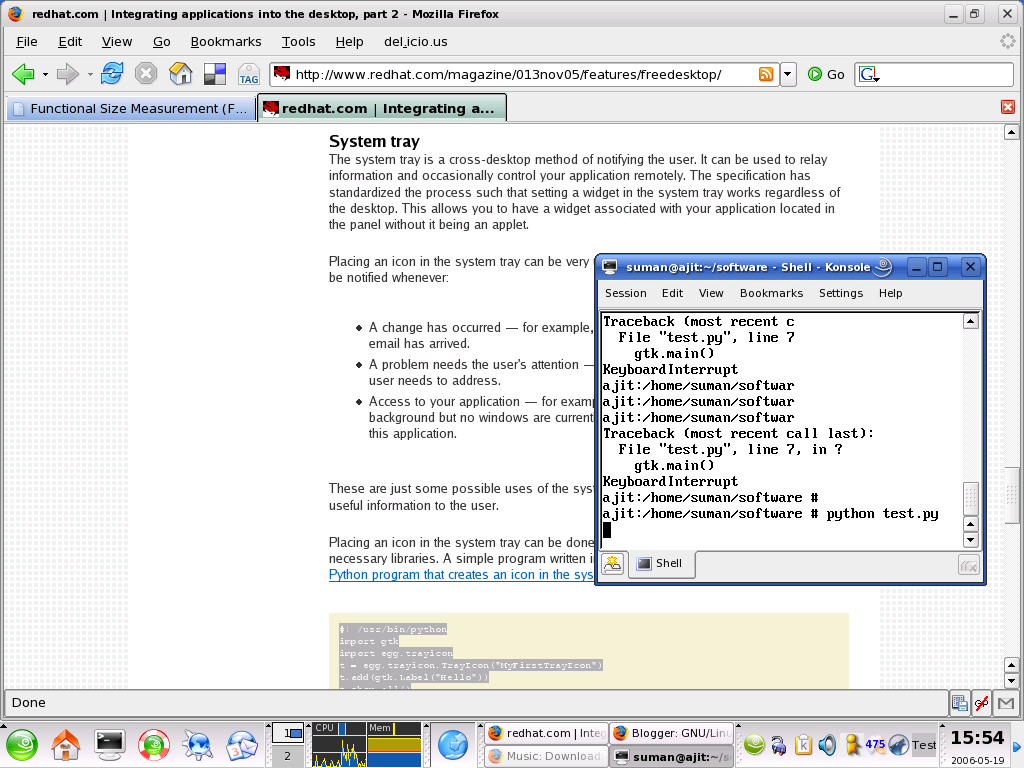
The system tray is a cross-desktop method of notifying the user. It will be very usefull for user. Suppose if you have mailclient[Kmail] and if it is in system tray then whenever new mail will come, it will pop up a new windows with notification of new mail. But question is how to write these kind of application? Well i was searching internet for document. Yesterday i got one document from redhat site . It is in perl language.Search the document
Procedure:
1.Your system should have perl and gtk 2.0.
2. We need two library called
a)gnome-python2-libegg-2.10.0-2.1
b)gnome-python2-extras-2.10.0-6
Just Download this two rpm and installl with --nodeps option like
suman@>rpm -ivh gnome-python2-extras-2.10.0-6.i386.rpm gnome-python2-libegg-2.10.0-2.1.i386.rpm --nodeps
Open a vi editor with file name test.py
#! /usr/bin/pythonCopy this code to the file. And run as suman> python test.py
import gtk
import egg.trayicon
t = egg.trayicon.TrayIcon("MyFirstTrayIcon")
t.add(gtk.Label("Hello"))
t.show_all()
gtk.main()
Thats's all !!! A "Test" system tray icon will be shown in your desktop system tray.
After long time back
Oh! I am writing my blog after 13 days. I went to attend my sister marraige. I couldn't get time to write. Well after comming back to my office, I started coustomizing the Open Source ERP product called Compiere . I successfully made some small changes with modify the source code.
Open Source News:
Okippi is the successor to Blue Security's Blue forge project..Now it is started...
Open Source News:
Okippi is the successor to Blue Security's Blue forge project..Now it is started...
Friday, May 05, 2006
Open Source Shooping cart application
If you are looking for good open source shopping cart software,visit Interchange. It worked so well that some company began an enterprise-wide migration to open source software that has Linux running everywhere, from the servers to the desktops.
Top 50 Open Source Application
Now we can do all our work with open source application. Sometimes i have seen that people don't find or don't know which open source applications are available to do certain job. Here is a list of 50 top open source application by devid uhlman which we can use for beginner to enterprise level.This is a pdf file. I am giving here linkwhere you can download. This pdf also contains the regarding application site name where you can get the software.Have a look ,Have a fun!
http://www.uversainc.com/download/top50.pdf
http://www.uversainc.com/download/top50.pdf
Thursday, May 04, 2006
OCFS2 project from Oracle
OCFS2 is the next generation of the Oracle Cluster File System for Linux. It is an extent based, POSIX compliant file system. Unlike the previous release (OCFS), OCFS2 is a general-purpose file system that can be used for shared Oracle home installations making management of Oracle Real Application Cluster (RAC) installations even easier. Among the new features and benefits are:
- Node and architecture local files using Context Dependent Symbolic Links (CDSL)
- Network based pluggable DLM
- Improved journaling / node recovery using the Linux Kernel "JBD" subsystem
- Improved performance of meta-data operations (space allocation, locking, etc).
- Improved data caching / locking (for files such as oracle binaries, libraries, etc)
OCFS2 will only work on the 2.6 series of the Linux kernel. As a result, OCFS2 packages are only available for 2.6 based distributions.
SuSE Linux Exterprise Server 9:Bundeled,need configuration
Red Hat Enterprise Linux 4:not bundeled ,need to download and configure
Ubuntu:Bundeled,need configuration
User Guide
Thursday, April 27, 2006
Source Control Management Tool
Wednesday, April 26, 2006
Yesterday I got a offer letter from Naturesoft,Chennai as a Technical Solution Analyst. My M.Tch will be finished at June,2006. I am very happy that i was employed before i finish my M.Tech.
Now i got too much interested with Linux kernel. I want to make my career with Linux.I found very good metirial to understand the linux kernel
Linux kernel Architecture
Linux Kernel
Now it is time for rock with Linux kernel......Hope i will do my best..
Now i got too much interested with Linux kernel. I want to make my career with Linux.I found very good metirial to understand the linux kernel
Linux kernel Architecture
Linux Kernel
Now it is time for rock with Linux kernel......Hope i will do my best..
Friday, April 21, 2006
New in Blog

Today i started my blog. I was inspired while i was browsing gaurav blog.I was priviously thinking that i should have my own website.I started with geocities free webhosting service but after sometimes i feeled that it is very time consuming task to post any comments on that site. So i decided to go for google blog.
Still i should have my own website where i can control each and everything. So what i need for that? One domain name, one good CMS,and little bit html knowledge... CMS should be open source. I decided to go for Drupal.And for hosting still i have to decide. Well my website should have more GNU/Linux related information that whoever will visit my site,they should able to learn something related to open source and GNU/Linux.This blog will not carry my daily activity generally.But sometimes it might be.My goal for creating this blog is to share my knowledge whatever i learned and will learn every day.finally i would like to say
It is very necessary to realize now that "Linux" is only a good monolithic kernel.It is one of the important subsystem of a whole GNU Operating System. We should not call "Linux" as a Operating System.
for more information visit this link:
Linux Kernel
GNU Philosophy
Still i should have my own website where i can control each and everything. So what i need for that? One domain name, one good CMS,and little bit html knowledge... CMS should be open source. I decided to go for Drupal.And for hosting still i have to decide. Well my website should have more GNU/Linux related information that whoever will visit my site,they should able to learn something related to open source and GNU/Linux.This blog will not carry my daily activity generally.But sometimes it might be.My goal for creating this blog is to share my knowledge whatever i learned and will learn every day.finally i would like to say
It is very necessary to realize now that "Linux" is only a good monolithic kernel.It is one of the important subsystem of a whole GNU Operating System. We should not call "Linux" as a Operating System.
for more information visit this link:
Linux Kernel
GNU Philosophy
Subscribe to:
Posts (Atom)